
Resume writing12 min read
Resume Templates for Microsoft Word: Pick One Written for Your Job
Most resume templates for Microsoft Word give you a layout and an empty page. Here is how to pick one that parses cleanly, fits on the right number of pages, and already has wording for your job.

On this page
Key takeaways
- Good resume templates for Microsoft Word are single column, with no tables, text boxes, icons or contact details tucked into the header. Those are the parts parsers most often scramble.
- Many of Word’s own built-in resume templates use tables for layout, and Microsoft’s help page says so. Check before you fill one in.
- Test any template in two minutes: save a copy as plain text and read it. If the order is wrong there, it can be wrong in an applicant tracking system too.
- One page fits most people with under about ten years in one line of work. Two pages is right when real experience needs the room.
- The layout is the easy part. What takes the evening is the wording, and a template written for your job title already has it.
The best resume template for Microsoft Word is a plain, single-column .docx with standard headings, and ideally one that already contains wording for your job. Most free Word templates solve the look and leave the page empty. Below is how to spot a template that parses cleanly, how to choose between one and two pages, how to edit it without breaking it, and a list of Word templates written for specific jobs.
Resume templates for Microsoft Word, written for your job

Choose the template by job title first and by look second. A recruiter hiring a nurse scans for a license line. One hiring a truck driver scans for CDL class and endorsements. One hiring a data analyst scans for SQL and the name of a BI tool. The same blank layout serves all three badly, because the part that decides the shortlist is the content, and a blank template has none.
Each kit below is a Word file already written for that job (a Microsoft Word resume example you edit, not just look at), with [BRACKETS] where your own employers, numbers and credentials go. The third column shows what the page leads with, which is also a fair checklist if you write your own.
| Job title | Industry | What the kit leads with |
|---|---|---|
| Registered nurse | Healthcare | RN license with state and compact status, BLS and ACLS, the EHR by name |
| Medical assistant | Healthcare | CMA (AAMA), RMA (AMT) or CCMA (NHA) written exactly, rooming, phlebotomy, prior authorizations |
| Software engineer | Technology | Languages and frameworks as postings name them, testing, code review, on-call |
| Data analyst | Data and analytics | SQL depth, a named BI tool, dashboards other people use, reconciliation |
| Administrative assistant | Operations and admin | Who you support, calendar management, travel and expenses, software named as products |
| Teacher | Education | State license, endorsement area and grade band, assessment data, IEP and 504 work |
| Accountant | Finance and accounting | Month-end close, balance sheet reconciliations, the ERP by name, CPA status stated exactly |
| Customer service representative | Customer service | First contact resolution paired with handle time, quality score, what you could approve alone |
| Truck driver | Transport and logistics | CDL class, endorsements and restrictions, verifiable months by equipment, hours-of-service record |
| Project manager | Product and project | Delivery method, PMP or PRINCE2, project values against baseline, change control |
| Electrician | Skilled trades | License stage and jurisdiction, documented apprenticeship hours, the NEC edition your area adopted |
| Graphic designer | Design and creative | Portfolio link in the contact line, Photoshop, Illustrator and InDesign by name, print production |
Not on the list? Every job title has its own page under all resume templates, with free sample bullets and keywords you can read before deciding anything.
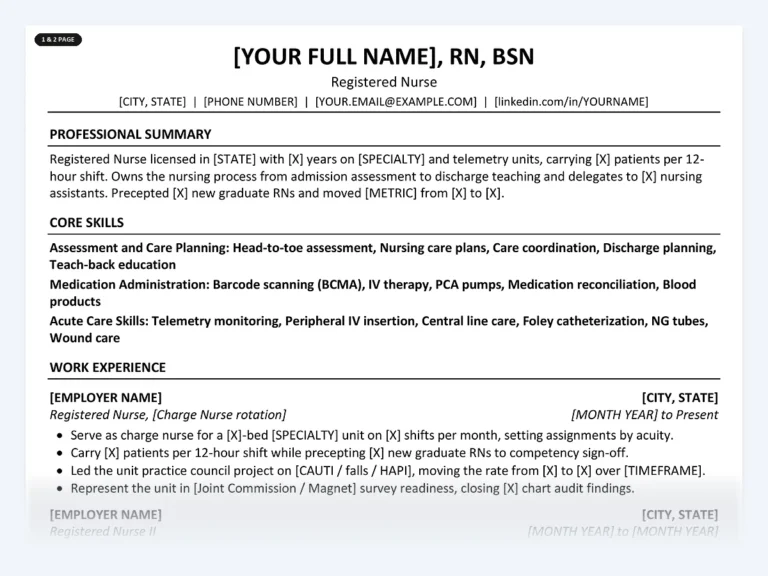
Registered Nurse Resume Kit
The license, BLS and ACLS sit in their own section near the top, where screeners look first. Bullets are written for bedside nursing, with brackets for your unit, ratios and EHR.
What makes a Word resume template ATS-safe

An ATS-safe Word template keeps every word in the main body of the page, in one column, in reading order. Applicant tracking systems pull the text out of your file and sort it into fields such as name, job title, employer and dates. The layout features that look good in a template are often the ones that make that step go wrong.
This catches people out with Word’s own gallery. Microsoft’s help page for resume templates notes that many of the designs use tables to organize the layout, and explains how to hide the borders (Microsoft Support). Hidden borders make the table invisible to you. The parser still sees cells, and it may read them across rows instead of down the column you meant.
What to avoid in a Word resume template
- Two columns built with a table, or a sidebar for skills and contact details
- Text boxes and shapes holding your name, summary or section titles
- Contact details placed in Word’s header or footer area, which some parsers skip
- Icons for phone and email instead of the words themselves
- Skill bars, star ratings and charts, which carry no readable text at all
- Decorative fonts that are not installed on the recruiter’s computer
What a parse-friendly template has instead
- One column, top to bottom, in the order a person reads it
- Standard headings: Summary, Experience, Education, Skills, Certifications
- Your name and contact line as ordinary text at the top of the body
- Dates written the same way in every entry
- A common font such as Calibri at a readable size (more in our guide to the best font for an ATS resume)
None of this is a promise about any particular system. There are many ATS products, each configured differently, and nobody can tell you in advance how one will score you. What you can control is removing the things that commonly break parsing. Our ATS-friendly resume format guide covers the section order in more detail.
The two-minute plain text test
Before you type a word into a template, check what a machine will see. This works for any .docx, including ours.
- Save a copy as plain text. In Word, go to File, then Save As (Save a Copy in newer versions), and choose Plain Text (*.txt) as the file type. Accept the conversion prompt.
- Open the .txt file in Notepad on Windows or TextEdit on a Mac.
- Read it top to bottom. Your name should come first, then contact details, then sections in order. Each job title should sit next to its own employer and dates.
- Look for trouble. Missing lines, a sidebar’s skills wedged between two jobs, or dates stranded far from the job they belong to all point to tables or text boxes underneath.
One page or two in Word

Use one page when you have under about ten years in one line of work, and two when your recent experience genuinely needs the space. Length is a consequence of what you have to say, not a target. A new graduate nurse with clinical rotations fits on one page. A project manager with a decade of projects, each with a value, a baseline and a change log, usually needs two.
What decides it is how many of your bullets are recent and relevant. Anything older than about 10 to 15 years, or unrelated to the job you want, can shrink to a single line or go. Our guide on how long a resume should be goes through the edge cases, such as career changers and federal applications.
| Your situation | Pages | Why |
|---|---|---|
| Student, new graduate or first job | 1 | Education, projects and one or two jobs fill a page well |
| Up to about 10 years, one field | 1 | Recent roles carry the case; older detail adds little |
| 10+ years, or senior and management roles | 2 | Scope, budgets and team sizes need room to be specific |
| Licensed trades and clinical roles with many credentials | 1 or 2 | Credentials take lines; keep them rather than cutting bullets to fit |
| Career changer | 1 | Lead with transferable work; trim the unrelated history |
Three Word habits keep a resume on the page count you chose:
- Check the count in the status bar at the bottom of the window, then confirm it in the PDF you export. The PDF is what the reader sees.
- Don’t squeeze. Body text below 10 point, or margins much under half an inch, trades a page for a harder read.
- Cut words before cutting lines. A bullet that wraps by two words usually has two words it doesn’t need.
Every Disruptive Templates kit ships both a 1-page and a 2-page Word version for the same job, so you pick the length that fits you rather than forcing your history into the one that came with the design.
How to edit a Word resume template without breaking it

Edit a template by replacing its text, not by rebuilding its layout. The spacing, styles and heading sizes are set up to work together, and most broken resumes come from pasting text in from somewhere else and dragging its formatting along with it.
- Turn on formatting marks. Press Ctrl+Shift+8 on Windows or Command+8 on a Mac, or click the ¶ button on the Home tab. You can now see stray spaces, extra blank lines and page breaks.
- Find every bracket. Press Ctrl+F (Command+F on a Mac) and search for an opening bracket. Word lists every placeholder so none survives into the version you send.
- Paste as plain text. When you copy wording from an old resume or a job ad, paste with Keep Text Only (Ctrl+Shift+V in recent Microsoft 365 versions on Windows). The template’s style then applies to it.
- Change the job title line to match the posting. Use the title as the ad writes it. Recruiters search for that exact string.
- Keep the font. A template built in Calibri should stay in Calibri. Swapping fonts moves line breaks and can push a one-page resume onto two.
- Save two versions. Keep the .docx for editing and export a PDF for sending, named something like Firstname-Lastname-Resume.pdf.
If you plan to finish the resume in Google Docs or Apple Pages, the guide to editing a resume template in Word, Google Docs and Pages shows what shifts during the import and how to fix it.
Replace the wording, not just the name
Most people swap in their name, employers and dates, then leave the template’s sample bullets nearly as they found them. That is the part a hiring manager reads most closely. Here is the difference for an administrative assistant:
The rewrite says who you supported, how much, and in which system. Those three facts place you at a level that the word “administrative” never will. If you want a second pair of eyes on a bullet, the free resume bullet rewriter turns a duty into an achievement line you can then correct with your own numbers.
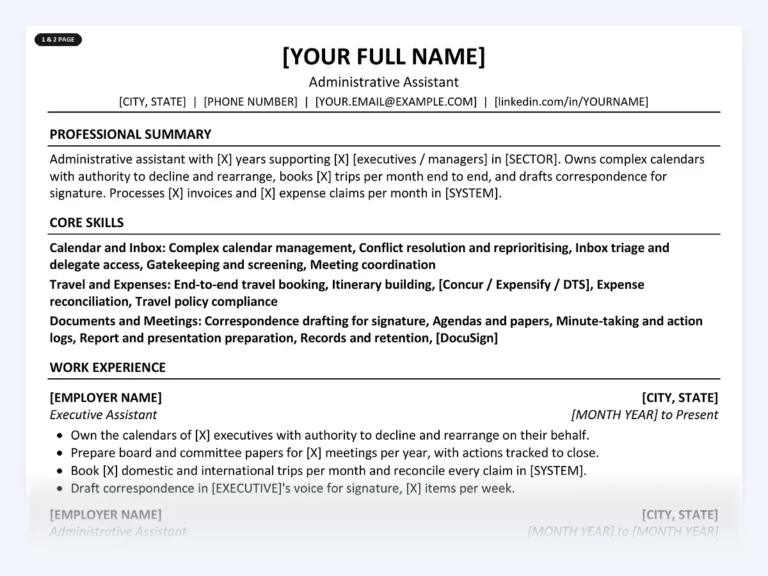
Administrative Assistant Resume Kit
Opens with who you support and at what level, then calendar, travel and expense work with Outlook, Excel and SharePoint named as products. You replace the brackets with your volumes.
Free resume templates for Word, or one written for your job
A free Word template is enough if you already have strong, specific bullets and only need a clean layout. It falls short when the blank page is the problem. Here is the honest comparison.
| Free blank template | Template written for your job | |
|---|---|---|
| Layout | Yes, and quality varies | Yes, single column, no tables or text boxes |
| Wording for your job title | No, generic sample text | Yes, with brackets for your details |
| Credentials placed where screeners look | You decide | Already placed for that job |
| 1-page and 2-page versions | Usually one | Both |
| Matching cover letter | Sometimes | Yes |
| Account or subscription to download | Some sites require one | No, you keep the files |
| Cost | Free | One-time purchase |
To find Word’s free templates, open Word, go to File, then New, and search for “resume”. Run the plain text test on whichever you pick. The simpler designs tend to hold up best.
What a template written for your job already knows
The real difference between a layout and a written template is judgment about what each profession screens for. When we researched these jobs against real postings, the first thing each hiring team checks varied a lot, and it rarely matched a generic template’s order.
Licensed and certified jobs lead with the credential
For a registered nurse, the license line comes first: RN, the issuing state, compact status, then BLS and ACLS with their expiry dates. For a medical assistant, the credential has to be written exactly. The AAMA asks for CMA (AAMA) with no variation, and a bare “CMA” is ambiguous because a Certified Medication Aide abbreviates the same way. A truck driver lists license class, each endorsement by letter and name, and any restrictions, honestly, because the motor vehicle record will show them anyway.
Tool-screened jobs lead with the product names
Accountants name the ERP, such as NetSuite, SAP or Sage Intacct, because a company running NetSuite searches for the word NetSuite. Data analysts put SQL and one BI tool in the top third, and show SQL depth with terms like window functions and CTEs. Software engineers name languages and frameworks exactly as the posting does, since TypeScript and JavaScript are different search terms.
Some jobs are judged on a record or a pairing
A customer service representative’s first contact resolution rate means little without the handle time next to it, and a hiring supervisor knows it. An electrician names the NEC edition their jurisdiction has adopted, not the newest one printed. A graphic designer’s resume exists mainly to get the portfolio opened, so the link goes in the contact line, not at the bottom.
A blank template can’t tell you any of this. You can work it out yourself from ten job postings for your title, and that is a good use of an evening if you have one. The kits exist for people who would rather start from a finished draft and spend the evening on their own numbers.
Common questions
Are Microsoft Word resume templates ATS-friendly?
Some are and some are not. Many of Word’s built-in designs use tables for layout, which some parsers read out of order. Pick a single-column template with no tables, text boxes or header contact details, then save a copy as plain text to check the reading order.
Should I send my resume as a Word file or a PDF?
Follow the posting or the application portal if it says. If it doesn’t, a PDF exported from Word keeps your layout fixed and its text stays selectable, which most systems can read. Keep the .docx as your working copy, since some recruiters ask for an editable file.
Can I open a Word resume template in Google Docs or Pages?
Yes. A .docx opens in Google Docs and Apple Pages. Simple single-column templates survive the import best; check spacing, bullets and page breaks afterwards, and export a PDF to confirm the page count.
Where do I find free resume templates in Word?
In Word, go to File, then New, and search for “resume”. On a Mac, use File, then New from Template. The templates are free; run the plain text test before you fill one in, since many rely on tables.
What font size should a Word resume use?
Body text between 10.5 and 12 point in a common font such as Calibri reads well on screen and in print. Headings can be a size or two larger, and your name larger again. Don’t drop below 10 point to squeeze onto one page.
Start from a Word file written for your job
Find your job title, read the free sample bullets and keywords on its page, and decide from there. Every kit is a set of .docx files you keep and edit in Word, Google Docs or Pages, with no account or subscription.
Find your job title
Written by
Founder, Disruptive Templates
Umair Sajid runs Disruptive Templates and has spent a decade in digital marketing, most of it looking at how people are found online. The resume templates here come from the same question asked of hiring software instead of search engines: what does the machine actually read?

Server Resume Examples: Covers, Checks and Upselling
Managers read a server resume for section size, covers per shift and how you move the check. Here are bracketed examples for casual, fine dining, banquet and bartender-server jobs.

Security Guard Resume Examples: License, Posts and Incidents
Recruiters at security companies check your guard card before anything else. Here is where it goes, with bullets for each post type, incident report wording and an armed version.

Project Manager Resume Examples: Scope, Budget and Delivery
Lead with your method and credential, give every project a size line, and write bullets about what the plan met in real life. With IT, construction and agile versions.