
Resume writing7 min read
Administrative Assistant Resume Examples and Skills
Lead your administrative assistant resume with who you support and the software you run, then give every bullet a volume. Examples for calendars, travel and invoices, plus entry level and executive versions.

On this page
Key takeaways
- Open with who you support and the software you run. “Supports [3] directors in Outlook and Concur” places you faster than “detail-oriented administrative professional”.
- Give every bullet a volume: calendars kept, trips booked, invoices processed, people onboarded.
- Name software as products with depth. “Excel (pivot tables, XLOOKUP)” beats “Microsoft Office”.
- Entry level resumes lead with transferable volume from school, retail or reception. Executive support resumes lead with the level of the person you support and your authority over their calendar.
An administrative assistant resume gets read for scope: whose time you manage and how much work goes through your hands in a week. Hiring managers can’t see any of that on a resume that lists “answered phones” and “filed documents”. Below are bullet examples with volumes, plus separate versions for entry level and executive support. If you’d rather start from a finished draft, the administrative assistant resume template follows the same structure.
Lead with who you support and the software you run

The title “administrative assistant” covers front-desk coverage at one end and board-level support at the other. The quickest way to place yourself in that range is the first line of your summary: how many people you support, at what level, and in which systems.
Software belongs in that first line because it’s what recruiters filter on. Outlook calendar management and travel coordination show up in many admin postings, and a posting that names Concur or Google Workspace is telling you which ones to write. Name the depth, too: “Outlook (shared calendars and delegate access)” tells the reader you’ve run someone else’s calendar. For more on summaries, see how to write a resume summary.
Administrative assistant resume bullets with volumes

Admin work is easy to undersell because the best of it goes unnoticed. The fix is to count it. Almost every task in this job has a number attached, and the number is what turns a duty into evidence. Each bracket below is yours to fill; see how to write resume bullet points for the general method.
| Task | What to count |
|---|---|
| Calendars | People supported, meetings a week, conflicts resolved |
| Travel | Trips a month, domestic or international, policy exceptions caught |
| Invoices and expenses | Invoices a month, expense reports, purchase orders raised |
| Meetings | Meetings minuted, turnaround time on actions |
| People | New hires onboarded, staff on time and attendance records |
| Events | Events a year, attendees, budget |
Calendars and meetings
- Kept Outlook calendars for [3] directors, resolving about [10] scheduling conflicts a week without escalating.
- Ran the [weekly] leadership meeting from agenda to action log, circulating minutes within [24] hours.
- Booked [25] rooms a week and set up video calls in [Teams] for hybrid attendees.
Travel and expenses
- Booked [15] trips a month in [Concur], including flights, hotels and ground transport, within the company travel policy.
- Reconciled [30] corporate card statements a month and returned [every] out-of-policy claim with the reason.
Invoices and office operations
- Processed [120] vendor invoices a month in [QuickBooks], matching each to a purchase order before approval.
- Ordered office supplies within the monthly budget and cut spend [12]% by consolidating to [2] vendors.
- Onboarded [18] new hires a year, arranging laptops, system access and first-day schedules.
Entry level vs executive administrative assistant resumes

The same job title reads very differently at each end of the range, so the resume should lead with different things. “Entry level” doesn’t tell you much about the employer, either. When we researched this role, a single entry level search returned administrative assistant jobs at small nonprofits and at a global investment firm. Read who is hiring and what their posting emphasizes before you decide which version of your resume to send.
| Entry level | Executive support | |
|---|---|---|
| Summary leads with | Software, reliability, customer-facing volume | Level of the executive and your authority over their calendar |
| Strongest evidence | Retail, reception, school office or data entry work with numbers | Board papers, confidential matters, cross-team coordination |
| Keywords to match | Data entry, scheduling, filing, Microsoft 365, customer service | Calendar management, gatekeeping, board papers, confidentiality, events |
| Length | One page | One or two pages |
Entry level administrative assistant resume: borrow volume from other jobs
If this is your first office job, look at what you’ve already done at scale. A cashier or receptionist has handled calls and customers at a set pace, which is exactly what an entry level admin posting asks for.
- Answered about [60] calls a day at a [dental office] front desk and booked [30] appointments in [Dentrix].
- Entered [200] customer records a week into [Salesforce] with a spot-checked error rate under [1]%.
- Scanned and indexed [3,000] paper files into [SharePoint] during a records cleanup.
Executive support: show level and authority
At this level the reader wants to know whose calendar you keep and how much you decide on their behalf. Name the level, not the person. The judgment is the job: knowing which meeting to decline, which visitor to let straight through, and which 7 a.m. email can’t wait. Bullets that show you made those calls read very differently from bullets that say you “managed the calendar”.
- Supported the [CFO and 2 vice presidents] with authority to decline or move meetings.
- Prepared board papers for [6] meetings a year and tracked every action to close.
- Handled [personnel and legal] matters before announcement with no confidentiality breaches.
- Coordinated with [8] other executive assistants to schedule quarterly leadership offsites.
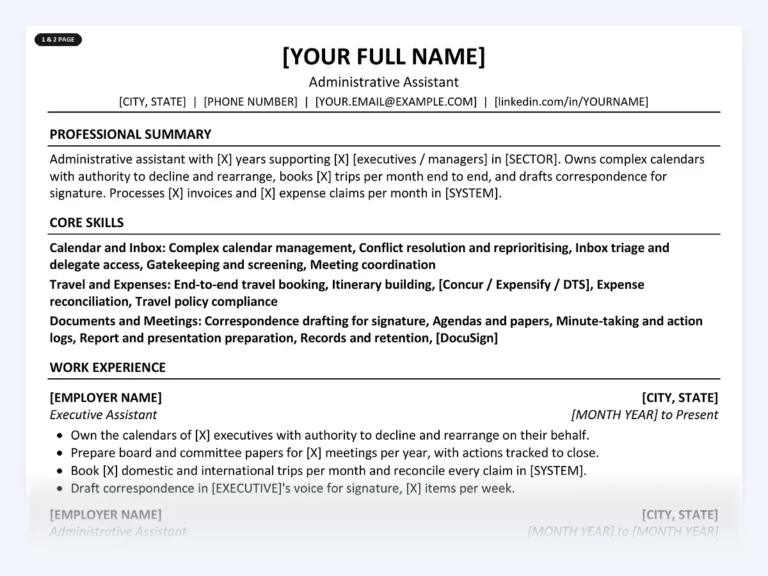
Administrative Assistant Resume Kit
A finished one-page and two-page resume written for administrative assistants, with the scope line and volume-based bullets in place. The Career Kit adds a 48-bullet library across four experience levels and an ATS keyword bank.
Closer to one end of the range? See the kits for an entry level administrative assistant, an executive administrative assistant or an office assistant.
Skills for an administrative assistant resume
Group your skills the way the work divides so a recruiter can scan them in one pass:
- Calendar and inbox: calendar management, meeting coordination, inbox triage, delegate access
- Travel and expenses: end-to-end travel booking, [Concur or Expensify], expense reconciliation
- Documents and meetings: correspondence for signature, minutes and action logs, [DocuSign]
- Office operations: invoice processing, purchase orders, onboarding, events
- Software: Microsoft 365 or Google Workspace, Excel (pivot tables, XLOOKUP), [SharePoint]
Certifications help most at the senior end. If you hold one, write it in full: Certified Administrative Professional (CAP) from the International Association of Administrative Professionals, Microsoft Office Specialist (MOS) or MOS Expert, or a Notary Public commission with your state and expiry date.
Then match the wording to each posting. Paste the job ad into the free ATS keyword checker to see which terms your draft is missing, and read our guide to keywords from a job description for where each one goes.
What to leave off an administrative assistant resume
- The names of the executives you support, or anything about their movements
- Details of confidential matters, even with names removed
- “Proficient in Microsoft Office” with no application or depth named
- Typing speed, unless the posting asks for it (some federal office automation roles do)
- A list of duties with no volumes
- An objective statement, a photo or your full street address
Common questions
What skills should an administrative assistant put on a resume?
Calendar management and travel coordination first, since many admin postings screen for them. Then name your software (Outlook, Excel, Google Workspace, Concur) with the depth you have, followed by invoice processing, minute-taking and onboarding if you do them.
How do I write an administrative assistant resume with no experience?
Use jobs where you handled calls, records or customers at volume, such as retail, reception, food service or a school office. Write those bullets with numbers, name any software you used, and put a Microsoft Office Specialist certification near the top if you have one.
Should an administrative assistant resume be one page?
One page for entry level and most roles under about five years. Executive assistants with a long record of senior support, board work and events can use two pages if the second page carries real evidence, not repeated duties.
How do I show discretion without breaking confidentiality?
Describe the category of information, not the content. “Handled personnel matters before announcement” shows trust without naming anyone. Leave out executives’ names and anything about their schedules, because a hiring manager reads that as a sign you’d do the same with theirs.
Is a degree required for administrative assistant jobs?
Many postings ask for a high school diploma or GED, and some executive roles prefer a bachelor’s degree. If you have one, list it. If you don’t, lead with software skills, volumes and a certification instead.
Start from a finished administrative assistant resume
The administrative assistant kit has the scope line and volume-based bullets already written, with brackets for your numbers and systems. Edit it in Word, Google Docs or Pages. The role page shows free sample bullets first.
See the administrative assistant kit
Written by
Founder, Disruptive Templates
Umair Sajid runs Disruptive Templates and has spent a decade in digital marketing, most of it looking at how people are found online. The resume templates here come from the same question asked of hiring software instead of search engines: what does the machine actually read?

Server Resume Examples: Covers, Checks and Upselling
Managers read a server resume for section size, covers per shift and how you move the check. Here are bracketed examples for casual, fine dining, banquet and bartender-server jobs.

Security Guard Resume Examples: License, Posts and Incidents
Recruiters at security companies check your guard card before anything else. Here is where it goes, with bullets for each post type, incident report wording and an armed version.

Project Manager Resume Examples: Scope, Budget and Delivery
Lead with your method and credential, give every project a size line, and write bullets about what the plan met in real life. With IT, construction and agile versions.